This news page contains items that we hope will be of interest.

OUR NEWSLETTER
Stay connected with our lively u3a newsletter—packed with the latest group news, member articles, helpful info, important notices, and reports from past events. A must-read for every member!
Group Updates
We have recently updated the following group pages:
Chair's Report - October & November 2026

We’ve over 400 members but on average about 130 attend our monthly general meetings and listen to the visiting speakers Sue Clements (our Speaker Coordinator) arranges.
As an old folkie at heart, I really enjoyed September’s presentation by Jim Causley. Sue has written about it, but I can tell you that Jim complimented our gathered members on the quality of their singing.
The difference between membership and general meetings shows that it’s our groups which are key to our continued success. The u3a week (19 - 27 September) had ‘expanding horizons’ as its theme. Nothing to do with waistlines but rather trying something new, just for fun. I’d be interested to hear from any member who has done just that. Perhaps you could write something for our December Newsletter.
At September’s general meeting, Richard Harvey (committee member for Group Liaison) asked if there would be any interest in a setting up a Qi Gong group. Maybe Qi Gong could be your ‘expanding horizon’. If you are interested, please get in touch with Richard. Contact details for all of your Committee are at the back of the Handbook and on the website.
Members at the general meeting expressed interest in the Committee arranging a presentation by Devon & Cornwall’s Crime Prevention Unit on Cyber Crime. Their talk has been very well received by Plymouth u3a and local WIs. As we have speakers lined up for our monthly meetings through to next July, it will have to be an additional meeting. Please look out for an email from myself or Andy Tattersall, our Secretary, about when we’ve managed to arrange it.
Finally, as a collector of LPs, I don’t want to ‘sound like a broken record’ but I must mention our need for a new Treasurer. Nick Hammond has to step down at the next June’s AGM and there are serious implications if we haven’t a replacement. The best solution is for someone to come forward before then, so that she or he can work alongside Nick, enabling a timely handover. In addition, the regional u3a has set up a peer group to support treasurers and the Tamar Valley u3a Network (of which we’re a member) has recently been re-established. Any interest or queries about what it involves please speak to me or Nick.
How to Deal with a Suspicious Phone Call
Advice from Devon & Cornwall Police
If someone calls you unexpectedly and starts asking for personal information, account details, passwords, PINs or security codes, don't feel pressured into responding.
Here's what to say:
"I don't give out personal information or account details during an unsolicited phone call. I'll contact the organisation directly using a trusted number." Then end the call.
Legitimate organisations will understand and support your decision to verify their identity independently. Be Aware of Spoofed Numbers. Criminals can manipulate the number that appears on your phone. This is known as number spoofing. A call may appear to come from your bank, the police, HMRC, Microsoft, Amazon, or another trusted organisation when it is actually coming from a fraudster. Never trust a caller simply because you recognise the number displayed on your phone.
Be Aware of Pressure Tactics. Scammers will often try to keep you on the phone. They may create a sense of urgency, claim there is an immediate problem with your bank account, computer or personal information, or attempt to shock and scare you into acting quickly. They do this to stop you taking time to think. Verify what they are saying, contact the organisation yourself, or seek advice from someone you trust.
Common examples include:
"Your bank account has been compromised.
""Money is leaving your account right now."
"Your computer has been hacked."
"You owe money and must pay immediately."
"A loved one is in trouble."
We're investigating suspicious activity on your account."
The stronger the pressure, the more suspicious you should be. Protect Yourself:
✅ Never give out passwords, PINs or one-time security codes.
✅ Hang up if you are unsure who is calling.
✅ Contact the organisation yourself using a trusted telephone number from its official website, app, bank card or previous correspondence.
✅ Be aware that phone numbers can be spoofed and should not be relied upon as proof of identity.
✅ Review your social media privacy settings regularly. Scammers will obtain information about you, from social media and other online sources, then use it to try and convince you that they are genuine.
✅ Think carefully before sharing any personal information online. Do your really want your CV available for all to see?
Remember Your ABC: Never Assume. Never Believe. ALWAYS CONFIRM.
If you receive an unexpected call asking for information, don't be rushed into making a decision. Take control of the situation, end the call, and then verify the caller independently. Be curious. Hang Up. Look Up. Call Back.When you make the call to a trusted and thoroughly verified number, you are in control of who you are speaking to. To quickly contact your bank call 159.
Don't let the caller provide the number you should call back on. Fraudsters may provide a fake number that connects straight back to them or an accomplice. Always find the contact details yourself and verify them independently using official websites, apps, bank cards, statements or previous correspondence. Ideally, call back using a different phone. If this is not possible, wait a few minutes before redialling, particularly if using a landline. Never trust the number. Trust the verification process.
Beware "Quishing" Scams Using QR Codes
Advice from Devon & Cornwall Police
Devon & Cornwall Police is warning residents about a growing cyber threat known as "Quishing", where criminals use QR codes to direct people to fraudulent websites designed to steal personal, financial or account login information. A QR code may appear safe because it avoids the suspicious links traditionally seen in phishing emails. However, scanning a malicious QR code can take you to a fake website that looks genuine and may ask you to enter passwords, payment card details, or other personal information.
How Quishing Scams Work
Criminals may send QR codes via:Email messages claiming to be from trusted organisations.
Fake parcel delivery notifications.
Banking security alerts.
Utility company invoices.
Account verification requests.
Printed letters, posters, or stickers placed over legitimate QR codes.
Warning Signs
Be suspicious if a QR code:
Arrives unexpectedly.
Claims urgent action is required.
Promises a refund, reward, or prize.
States that an account will be suspended unless you act immediately.
Requests account credentials or payment details after scanning.
How to Protect Yourself
✅ Think before you scan.
✅ Verify who sent the message.
✅ Preview the website address if your phone offers this option.
✅ Check that the web address matches the genuine organisation.
✅ Never enter passwords, banking details, or one-time passcodes unless you are absolutely certain the website is legitimate.
✅ If in doubt, visit the organisation's website directly using your browser rather than scanning the QR code.
If You Have Scanned a Suspicious QR Code
If you entered login or payment details after scanning a QR code:
Change your passwords immediately. If financial details were provided contact your bank by calling 159
Enable Two-Step Verification (2SV) / Multi-Factor Authentication (MFA) on affected accounts.
Regularly monitor all your accounts for unusual activity.
Report the incident to Report Fraud.
Reporting Forward suspicious emails to: report@phishing.gov.uk and suspicious texts to 7726.
🔹 Report fraud or cybercrime to Report Fraud: 🌐 UK's Home for Reporting Cyber Crime & Fraud - Report Fraud 📞 0300 123 2040.
Remember - QR codes are simply another way of delivering a web link. Treat every unexpected QR code with the same caution you would apply to an unexpected email link.
STOP • THINK • VERIFY Taking a few moments to independently verify, then double check, before scanning can prevent your personal information or money from falling into the hands of criminals.
IF IN ANY DOUBT DON'T SCAN.
Fraud and Cybercrime
Advice from Devon & Cornwall police
Criminals continue to impersonate trusted organisations such as HMRC, banks, Amazon, Sky, Royal Mail and parcel delivery companies to steal personal information, banking details and money. These scams commonly arrive by text message, email, phone call or social media and are designed to create urgency, fear or excitement to encourage quick action.
Common Current Scams:
HMRC fraud
Messages claiming you are due a tax refund and asking you to click a link to claim it.
Bank impersonation scams
Calls or texts claiming your account is at risk and instructing you to move your money to a "safe account".
Amazon account alerts
Emails warning of suspicious account activity and directing you to a fake login page.
Sky account offers
Calls or emails offering discounts, upgrades or refunds while requesting personal or financial information.
Parcel delivery and parking payment scams
Texts claiming a small fee is required to release a parcel or settle a parking charge via a fraudulent website.
Computer takeover scams
Fraudsters may call unexpectedly claiming there is a problem with your computer, internet connection, bank account or security software. They may pretend to be from Microsoft, your broadband provider, a bank or a technical support company. They will try to persuade you to install software, visit a website or grant remote access to your device. Once connected, they can steal personal information, online banking credentials and money. Remember: A genuine company will not cold call you and ask to take control of your computer, tablet or smartphone.
Protect Yourself: Remember ABC
A - Assume nothing
Never assume a message, call or email is genuine simply because it appears to come from a trusted organisation.
B – Believe nothing
Do not believe claims that create urgency, fear or excitement, such as refunds, account problems, special offers or security threats.
C – Check everything
Always verify requests independently by contacting the organisation using trusted contact details you've obtained yourself.
Stay Safe
✅ Do not click links in unexpected messages.
✅ Never share passwords, PINs or one-time passcodes.
✅ Never transfer money because someone claims your account is at risk.
✅ Never allow an unexpected caller to take remote control of your computer, tablet or smartphone.
✅ If someone asks you to install software or visit a website so they can "fix" a problem, end the call immediately.
✅ If you're unsure, stop and speak to someone you trust before taking action.
✅ If contacted by someone claiming to be from your bank, hang up and ideally via another phone line, call them back using the 159 service or a trusted number.
✅ Report suspicious text messages by forwarding them to 7726 (SPAM).
✅ Report suspicious emails to report@phishing.gov.uk.
If you are the victim of Fraud or Cybercrime
Report online here: UK's Home for Reporting Cyber Crime & Fraud - Report Fraud or call: 0300 123 2040.
Remember - Take a moment to stop and think. A genuine organisation will not pressure you into making important decisions, an immediate payment, or money transfer.
Think ABC: Assume nothing. Believe nothing. Check everything.
TV Licence Phishing Emails
Advice from Devon & Cornwall police
Residents across Devon and Cornwall are being warned about scam emails claiming that a TV Licence payment has failed or that account details need updating. These emails often create a sense of urgency and encourage you to click a link to:
❌ Confirm payment details
❌ Update account information
❌ Avoid losing your TV Licence
The link leads to a fake website designed to steal your personal, banking, or login details. Protect Yourself
✅ Be cautious of unexpected emails about missed payments or account problems.
✅ Never click links in unsolicited emails or text messages.
✅ Never enter bank details, passwords, or personal information after following a link in an email or text.
✅ Check the sender's email address carefully. Criminals often use addresses that look genuine at first glance.
✅ The genuine TV Licensing website has a scam advice section available here - Helping you avoid TV Licensing scams – and how to report one - TV Licensing ™
If You Have Clicked the Link or Shared Details
🔹 Contact your bank immediately by calling 159.
🔹 Change any passwords or PIN's that may have been compromised.
Reporting
🔹 Forward suspicious emails to: report@phishing.gov.uk and suspicious texts to 7726.
🔹 Report fraud or cybercrime to Report Fraud: 🌐 UK's Home for Reporting Cyber Crime & Fraud - Report Fraud 📞 0300 123 2040
Remember Criminals regularly recycle well-known scams because they continue to catch people out.
🛑 Stop. Think. Check. Taking a few moments to verify a message before responding could prevent you from becoming a victim of fraud.
👥Please share this advice with friends and family.
Scam letters requesting payment
Advice from Devon & Cornwall Police
Have you received a scam letter purportedly from South West Water telling you there is a debt on your account and to make payment through the QR code on the letter? – here is what to do – Devon & Cornwall Police have received reports of residents receiving scam letters purportedly from South West Water, which have been hand delivered in the Plymouth area. Offenders have used a standard SW Water letter, but have changed the payment details.
Scam letter? Report it! Please report this to police via our website here or by phoning 101 if you have received one of these letters, quoting 50260275737. Please also report this to Report Fraud by phoning 0300 123 2040. Every report helps the authorities and service providers identify nuisance and scam letters, making it harder for criminals to target the public. Please share this advice with family and friends, especially those who may be more vulnerable to scams.
Amazon Scam
Advice from Devon & Cornwall Police
More than £86,000 was stolen in just nine days by fraudsters pretending to be from Amazon.
Report Fraud has identified an increase in scams where criminals contact people unexpectedly, claiming there is suspicious activity on their Amazon account. They may say items have been added to your basket or that your bank details are being used fraudulently.
❌ The scammer may then ask you to:
Share your screen using a messaging app.
Download software or money transfer apps.
Provide identification such as a passport or driving licence.
Allow remote access to your computer or phone.
Authorise payments or buy gift cards to "secure" your account.
✅ Remember: Amazon, your bank and the police will never ask you to transfer money, grant remote access to your device, or share sensitive financial information over the phone.
🛑 If you receive a suspicious call:
Hang up immediately.
Contact Amazon or your bank using official contact details you have obtained yourself and thoroughly verified (ideally use another phone).
Call 159 to quickly and securely contact your bank if needed.
Never trust caller ID as proof of identity as phone numbers can be "spoofed"
Forward suspicious text messages to 7726.
Forward scam voice call phone numbers by texting the word 'Call' followed by the suspicious phoned number to 7726.
If you believe you've been a victim of fraud, report it to 🌐UK's Home for Reporting Cyber Crime & Fraud - Report Fraud or 📞 0300 123 2040📢
Please share this warning with friends, family and neighbours, particularly older relatives, as criminals often target trusted brands to convince victims to act quickly.
Passkeys
Advice from Devon & Cornwall Police
People are increasingly asking about passkeys, so here's a simple guide to what they are and why they matter.
A passkey is a new and more secure way to sign in to your online accounts without having to remember a password.Instead of typing a password, your phone, tablet or computer confirms it is really you using:
• Your fingerprint
• Face recognition
• A PIN or screen lock.
Passkeys are designed to be much harder for criminals to steal, guess or trick you into revealing.
Why Are Passkeys Safer? Traditional passwords can be:
• Forgotten
• Stolen in data breaches
• Guessed by criminals
• Entered into fake websites by mistake.
Passkeys help protect against these risks because there is no password to steal, reuse or share. Even if you accidentally visit a fake website, your passkey will not work on it, helping to protect your account from phishing scams.
Where Can I Use a Passkey?
Many popular online services now support passkeys, including:
• Google
• Microsoft
• Apple
• Facebook
• Instagram
• X (formerly Twitter)
• LinkedIn
• Amazon.
To check whether a service offers passkeys, look in your account's Security or Sign-in settings.
How Do I Set Up a Passkey?
Sign in to your account.
Go to Settings or Security Settings.
Select Passkeys or Create a Passkey.
Follow the instructions on screen. Confirm your identity using your fingerprint, face recognition or device PIN. Once set up, you can use your passkey the next time you sign in. More information concerning Passkeys, including a short video, can be found on the National Cyber Security Centre's website here - Passkeys: what you need to know | National Cyber Security Centre
Remember:
✅ Use a passkey whenever one is available.
✅ If a passkey is not available, use a strong, unique password and enable two-step verification (2SV).
✅ Keep your phone, tablet or computer protected with a PIN, fingerprint or face recognition.
The Bottom Line - Passkeys make signing in easier and more secure. They help protect your accounts from common cyber threats and remove the need to remember complex passwords. Please feel free to share this message.
New Group - QI Gong
QI Gong is described as a “free flowing” form of Tai Chi. It does not use so many structured movements. We have heard from a volunteer who might set up and lead such a group. If you are interested in joining, please let Richard Harvey (Groups Liaison) or one of your committee have your name. Many thanks.
Fresh flowers for a job well done
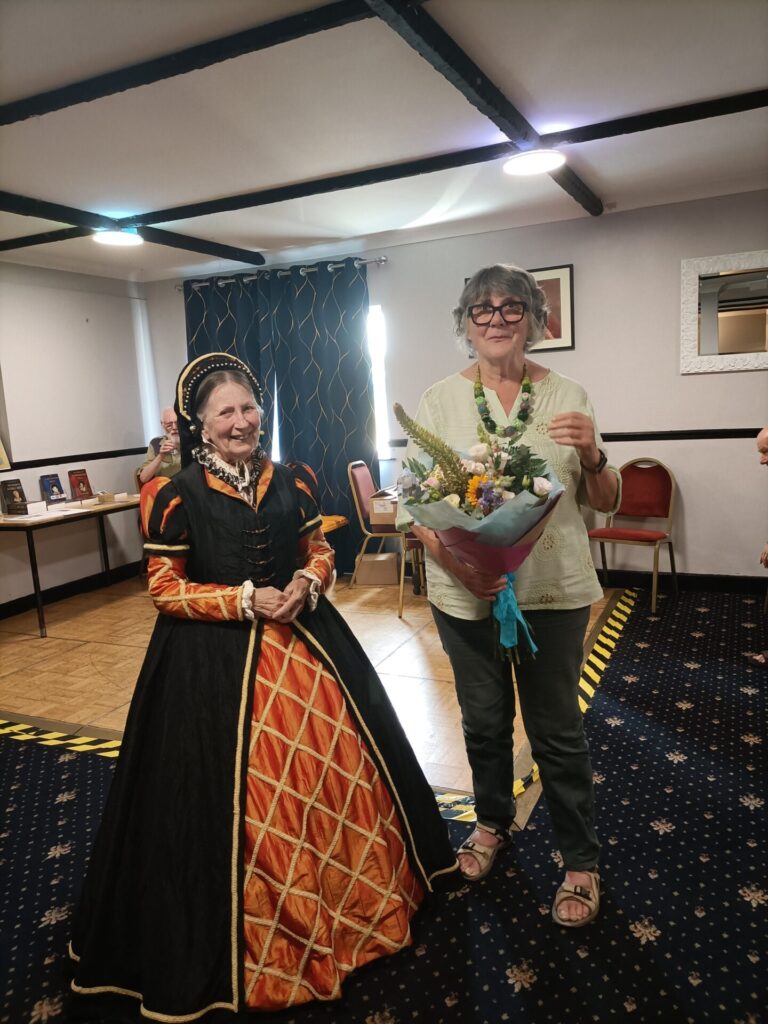
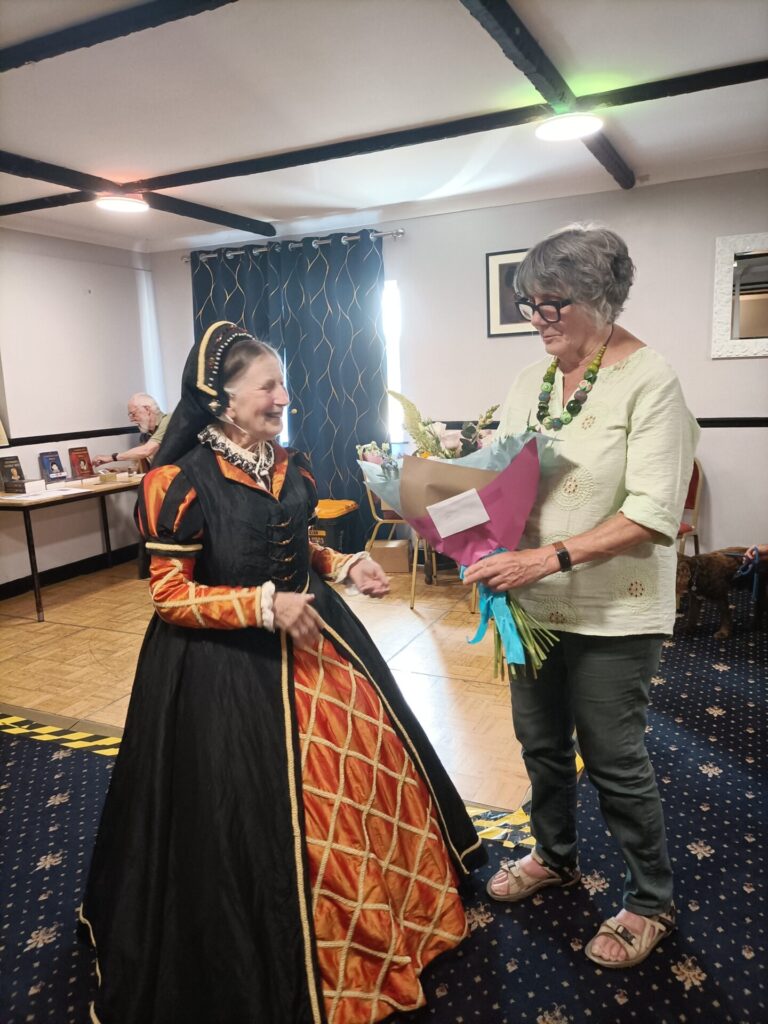
At the Local History Group talk on Tuesday 21st July, a beautiful bouquet was presented to our newsletter editor Jan Langalaan to thank her for all her hard work producing the Annual Members’ Handbook and the monthly Newsletter. The guest speaker, Rosemary Griggs, in her persona as Lady Katherine Champernowne,, presented the bouquet to a very surprised Jan. As you can see from the photos, Rosemary was in her splendid Tudor costume!
Who's Who
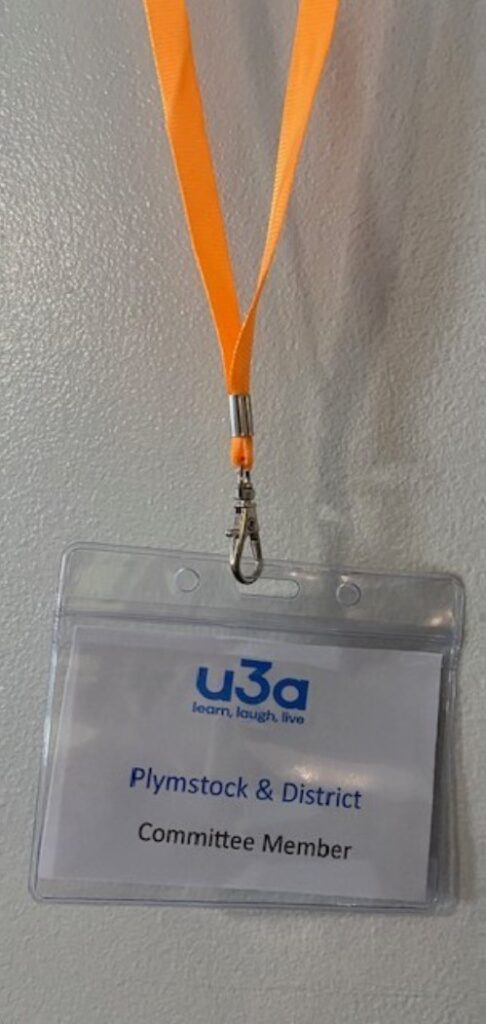
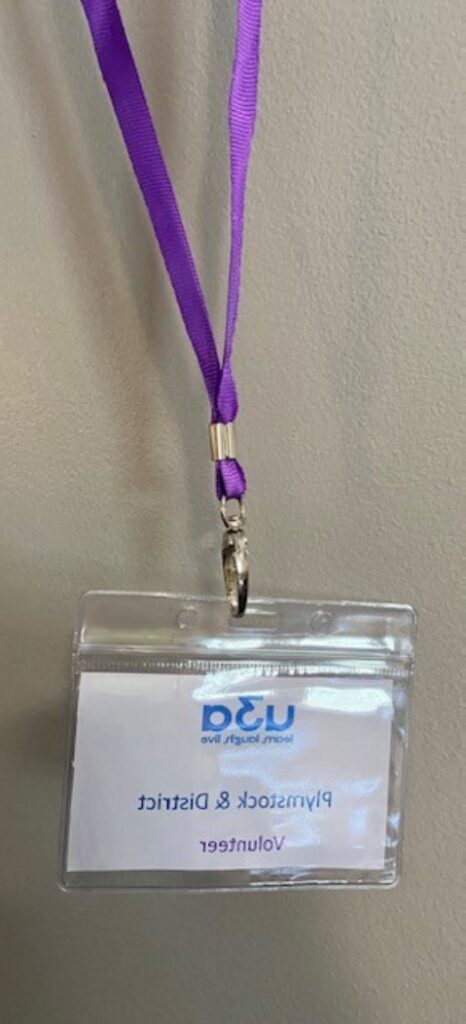
At our General Meetings, or indeed any other event or function, when you see a person wearing a bright orange lanyard you will know that person is a member of our loyal Committee. When you see a person wearing a purple lanyard it means that person is one of our hard working and faithful volunteers. Of course both groups of people are volunteers and always ready to help should you need anything. Don’t be afraid to ask - we’re happy to help.
Singing for Fun Group - Pianist Required
Amongst our 400 or so u3a members, is there someone who could help this jolly little group of singers? They are looking for someone to accompany them on the piano. If you can help, please contact the group leader, Shirley at shirham@sky.com. Thank you!
Digital Life Organisation and Legacy Support
Alice Boden recently approached our u3a with details of a service she provides to ensure online accounts, photos, passwords and subscriptions are organised, so that if anything happened, the family could find what they need. It’s one of those things almost everyone has been meaning to sort out but never quite gets to do. The service is called Sort My Digital Life, and we think our members might find it of interest.
You can find further details at: https://sortmydigitallife.co.uk/
Could you help shape the future of Third Age Trust Trading Ltd?
We are looking for u3a members with commercial experience to join the TATTL Board as voluntary Non-Executive Directors. TATTL's purpose is to generate an income that supports the charitable objectives of the Trust, by providing services to u3as and their members in a tax efficient manner. This includes the production of u3a matters magazine and digital service for u3as.
We are especially interested in members with experience in areas such as:
- publishing
- digital services
- member services
- marketing
- brand
- customer engagement
- business development.
We also need volunteers with digital skills and experience to join our Digital Services Advisory Group. This group supports the work of TATTL by assisting with strategic thinking and insight. If you have skills and experience in the following areas then please get in touch:
- digital product development
- online platforms
- digital solutions and Software as a Service (SaaS)
- customer relationship management systems
- user experience
- digital transformation.
Full details on both roles, with information on how to apply, are on the volunteering page on the u3a website.
OPAAl and Bereavement Planning
At OPAAL, we have seen growing demand from both our members and the wider public for information and support around planning for a dignified death and helping those who are left behind after a death.
While conversations about death and bereavement can be difficult, many older people tell us they want practical guidance to help them prepare, reduce stress for loved ones, and ensure their wishes are known. Others are concerned about what will happen if they have limited family or social support around them.
In response, OPAAL has developed a range of free resources and checklists designed to help older people navigate this challenging period. The resources provide practical, easy-to-follow guidance on topics such as planning ahead, recording important information, considering end-of-life wishes, and helping those left behind manage the practicalities after a death.
Importantly, the resources have been designed for people in different circumstances, including those who have a close network of family and friends, as well as those who may be more socially isolated or without immediate support.
The full range of resources can be accessed at:
www.opaal.org.uk/campaigns/
We recognise that planning for the end of life and coping with bereavement can feel overwhelming. Our message is simple: nobody should have to face these challenges alone. If older people need additional guidance or support, they can come to OPAAL and we will do our best to help.
Spare Knitting Yarn
Please could you donate any spare knitting yarn? This will be knitted up into blankets, teddy bears and so on for Ukraine. Thank you all for your support!
As usual there will be a box at General Meetings for your donations.
Organiser: Sue Stoker
Discarded Spectacles
If you have any discarded spectacles could you please bring them to the General Meetings? There will be a box available at the back of the room where they can be placed. Your gratefully received donated specs will be sent to Ukraine.
Mission Aviation Fellowship (MAF)
Postcard & Foreign Currency Donation Charity
Instead of recycling or discarding postcards which you receive, mostly during the holiday season, you may wish to donate them to the above charity - when you have finished enjoying them of course. This charity flies into remote areas of the world, such as Papua New Guinea and Sierra Leone delivering education, supplies, and health workers to the poorest communities. More details can be found on their website. https://www.maf-uk.org. It is a Christian charity which may not suit everyone, but the work they do is vital and life saving. In order to raise funds, picture postcards are collected - written on or not, old or new - and sold by the charity.
A MAF box for the collection of your post card donations will be available at our monthly General Meetings.
Alongside the post card collection box, in future there will be another box, in aid of the same charity, where u3a members can donate any odd foreign currency they may have left over from their trips abroad.

Foreign Coin Collection
Alongside the post card collection box at General Meetings there is now another box, in aid of the same charity (Mission Aviation Fellowship - MAF) where u3a members can donate any odd foreign currency they may have left over from their trips abroad. In addition to foreign coins redundant British coins may be donated. All gratefully received!
Hazel Scott will be taking care of this.
Used Stamps
Once again thank you for those of you who have been bringing in your used stamps. We are now donating stamps to the British Heart Foundation and we should appreciate your trimming the stamps as shown.
